QLIK AUTOMATE®
Automate Workflows and
Act on Data in the Moment
Turn insights into action. Build the no-code automations agents and teams call to act on data in real time, in Qlik Cloud Analytics®.


Build Smart Automations, Faster
Simplify your processes. Build and deploy automated workflows across your SaaS apps and data sources using drag-and-drop tools and smart logic.
Drag. Drop. Done.
Eliminate repetitive work with a visual interface to build automations. No need to write code or start from scratch: use drag-and-drop or a pre-built template to automate reports, data reloads, and process flows.

Connect Virtually Anything
Connect to Salesforce, Teams, Slack, GitHub, and more with Qlik Automate. Our extensive connector library makes it simple to bring your apps and data together in one flow.

Automate Smarter
Respond to data changes, schedules, and agent calls in real time with pre-built processing blocks. Streamline APIs, define logic, and scale operations in Qlik Cloud®.

Just Ask
Run automations through natural language in Qlik Answers® with the Automate agent. Let people trigger pre-built workflows just by asking: the agent makes the call, the automation does the work.
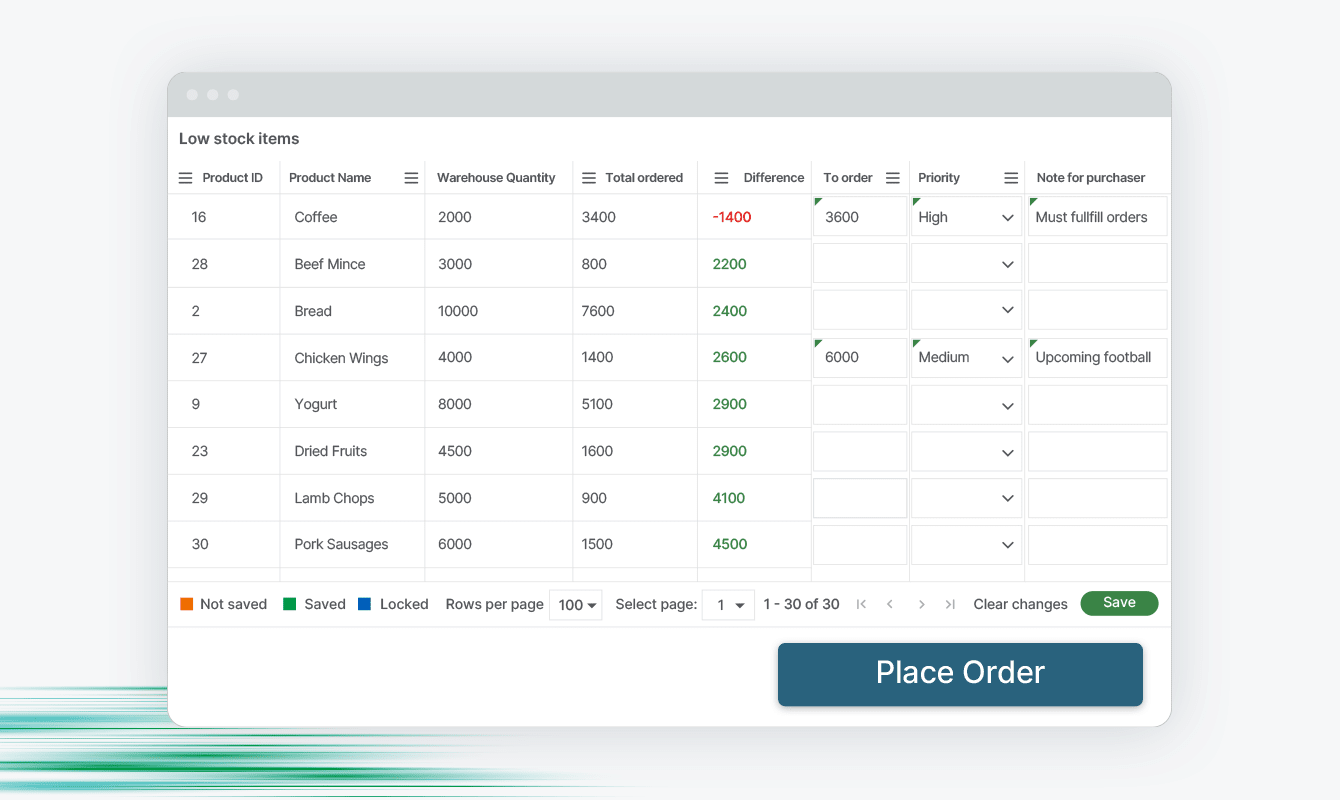
Turn Insights into Actions that Drive Business Outcomes
Alert and Inform in Real Time
Multi-Channel Notifications
Get real-time alerts via Slack, Teams, email, and more based on triggers or schedules. Stay informed, wherever you are.
Flexible Triggering Options
Respond to events with API calls, schedules, or user actions. Automate what matters, when it matters
Stay Ahead of Issues
Identify issues before escalation. Automate alerts and mitigation workflows

Compel Smart, Fast Action
Trigger Decision-Based Flows
Act on analytics. Build flows that trigger decisions and automate resolution.
In App Action
Take action in Qlik apps, execute actions in third-party systems, and automate DevOps and admin in one place.
Sync Critical Systems
Connect CRM, ERP, and ticketing systems for cross-platform actions.

KEY RESOURCE
Go From Data to Decision
Drive faster decisions with Qlik Automate. Download this eBook to learn how to automate data workflows, connect your tools, and trigger immediate business outcomes.



With Qlik Automate, agents can immediately access information about customer usage, subscriptions, service-level agreements, whatever they need. It all helps make this process much more efficient.
Nevo Potok
Business Intelligence Lead, Cloudinary
Drive speed, insight, and scalable success.

Get more done, faster
Automate reports, reloads, and admin tasks. Use drag-and-drop tools to speed up workflows and reduce reliance on IT.

Inform decision making
Monitor live data and trigger actions, agent-driven or rule-based, across platforms in real time.

Streamline operations
Integrate with Slack, Teams, and SaaS apps to streamline operations and scale processes.
See Qlik Automate turn insights into real-time action with no code. Send alerts, sync tickets, and keep your team in the loop with smart, flexible workflows, decision-based flows, and built-in visibility.
Discover More in Qlik Cloud
See how Qlik Cloud brings teams trusted data integration, AI-driven insight, and visibility across the data lifecycle.
Why Qlik Cloud
Application Automation Overview
Qlik Cloud Platform Features
Integration Connector Library
Frequently Asked Questions (FAQs)
Workflow automation is the use of technology to automatically carry out a sequence of tasks or steps in a process, routing information and triggering actions with minimal manual effort. Instead of people moving work from one step or system to the next by hand, software handles the handoffs based on defined rules. It cuts repetitive work, reduces errors and delays, and frees people to focus on higher-value tasks.
Business process automation (BPA) is the use of technology to automate complex, often end-to-end business processes rather than just individual tasks. Examples include employee onboarding, invoice approval, and order fulfillment: processes that span multiple steps, systems, and people. The goal is to make these processes faster, more consistent, and less costly while cutting manual errors.
Robotic process automation (RPA) uses software "bots" to mimic the actions a person takes in digital systems (clicking, typing, and copying data between applications). It's especially useful for repetitive, rule-based tasks and for connecting systems that don't easily integrate. Because bots follow defined steps exactly, RPA improves speed and accuracy for high-volume, structured work.
Hyperautomation is a business approach that aims to automate as many processes as possible by combining multiple technologies: RPA, artificial intelligence, process mining, and integration platforms. Rather than automating one task at a time, it coordinates these tools to scale automation broadly across an organization. Gartner popularized the term, which reflects a shift toward end-to-end, intelligent automation.
A trigger is the event or condition that starts an automated workflow. It can be many things: a new record being created, a metric crossing a threshold, a scheduled time, or an incoming request from another system. The trigger defines when an automation runs, so the right actions happen at the right moment without someone starting them by hand.
A webhook is a way for one application to automatically send real-time data to another when a specific event occurs, using an HTTP request to a designated URL. Unlike repeatedly checking a system for updates, a webhook pushes information the instant something happens. That makes webhooks a common way to trigger automated workflows immediately in response to events in other tools.
Orchestration is the coordination and management of multiple automated tasks, systems, and services so they work together as a single, end-to-end process. It goes beyond automating an individual task to sequencing many of them across different applications, handling dependencies, conditions, and data flow between steps. Good orchestration keeps a complex workflow running reliably from start to finish.
Closed-loop analytics is an approach where insights from data feed directly back into business processes to drive action, and the results of those actions flow back into the data to inform the next cycle. This connects analysis to operational outcomes, rather than stopping at a report or dashboard. The "loop" creates a continuous cycle of measuring, acting, and learning that keeps improving decisions over time.
In automation, human-in-the-loop (HITL) is a step in an otherwise automated workflow where a person reviews, approves, or makes a decision before the process continues. It keeps human judgment in control of important, sensitive, or high-risk actions while automation handles the routine steps around them. This balance lets organizations move quickly through automation without giving up accountability for critical decisions.